
Coloring Book: Color by Number
Candy MobileBoard
4.526.61K Reviews
- Version
- 3.8.7
- Installs
- 50.00M
- Age Rating
- Everyone
Screenshots
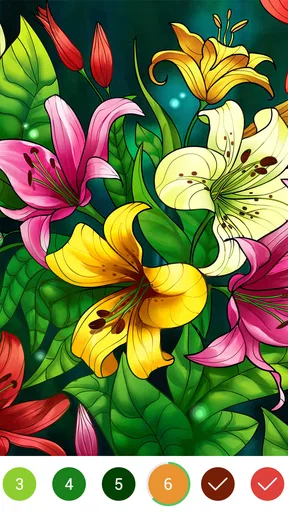







Our Review of Coloring Book: Color by Number
 Analysis by Appyee
I approached Coloring Book: Color by Number expecting a simple way to pass a few quiet minutes, and that is exactly where it works best. This is a free board game from Candy Mobile built around filling numbered sections with matching colors. It is easy to understand almost immediately, but the small decisions around zooming, choosing pictures, and managing your attention make a noticeable difference once you spend more time with it.
The basic appeal is straightforward: select an image, identify the numbered areas, and tap the color that belongs there. The result is a calm, low-pressure activity rather than a game that demands quick reactions or complicated planning. I found it particularly comfortable when I wanted something to do while listening to a podcast, waiting for an appointment, or winding down before bed.
Its broad reach is not surprising. The game has passed 50 million installs and holds a 4.5 average from roughly 229,000 ratings. Those figures suggest that the format has connected with a large audience, but they do not remove the need to ask whether this particular style of coloring suits you. If you prefer drawing freely, competing against other players, or solving deep board puzzles, this will feel limited. If you enjoy orderly progress and gentle repetition, it is much easier to recommend.
How I use the basic coloring workflow
I start by choosing a picture that fits the time and attention I have, then work through one color at a time rather than tapping at random. That simple routine makes it easier to see progress and avoid losing my place, especially when I return to an unfinished image. Next, I look at how to handle the smaller sections without letting careful coloring turn into a chore.
Starting with the right picture
The first useful habit is choosing an image based on your available attention, not just its appearance. A picture with broad areas is a better choice when I only have a few minutes. More intricate artwork is more satisfying when I can stay focused, because tiny uncolored sections become frustrating if I keep stopping and returning to them.
The game’s number-matching system gives every picture a clear starting point. I normally select a visible color, scan for its numbered spaces, and work through the larger sections before dealing with the small ones. This reduces the feeling of jumping randomly around the image and makes progress easier to see.
That approach also helps when a picture contains many similar-looking areas. Rather than tapping wherever my eye lands, I keep one color active and search methodically. It is a small change, but it prevents the common mistake of repeatedly opening the palette just to switch back and forth between colors.
Why zooming matters more than speed
Small sections are where the experience can either remain relaxing or become tedious. I use a two-stage rhythm: first I complete the obvious areas at the normal view, then I zoom in for the remaining details. Trying to finish everything without enlarging the image makes the screen feel crowded, while zooming too early can make it harder to understand the overall composition.
When the picture is enlarged, I move across one area at a time instead of chasing isolated gaps. This is especially useful around outlines and clusters of tiny spaces. The goal is not to color as quickly as possible; it is to reduce unnecessary searching and avoid losing track of where I have already worked.
One practical tip is to pause before tapping a very small section. I check the number, confirm the active color, and then tap once. That sounds obvious, but hurried taps are the main source of friction in this kind of game. A slower, deliberate rhythm is usually faster than correcting a string of uncertain touches.
A realistic everyday session
My most natural use case is a short evening session. I choose a moderately detailed image, complete the larger parts while listening to something else, and leave the tiny finishing work for a second sitting. That makes the game feel like a small routine rather than a task I must complete in one go.
It also works during waiting periods because there is no need to remember a complicated story or rebuild a strategy after putting the phone down. I can return to the same picture and immediately understand what remains. For children and adults who like visual feedback, that clear unfinished-to-finished transition is one of the strongest parts of the design.
Settings and habits worth checking
I would spend a moment looking through the available in-game options before settling into a routine. The most important consideration is comfort: adjust the way you hold the phone, use zoom when details become cramped, and avoid treating every picture as a race. The game is more enjoyable when the interface supports careful tapping instead of encouraging frantic movement.
It is also worth paying attention to how interruptions affect your session. If you are playing in a noisy place or switching between apps often, choose simpler images and complete them in short sections. If you are using it as a relaxation activity, set aside a longer uninterrupted stretch and select artwork with enough detail to keep your hands occupied.
I would not assume that every available picture deserves the same amount of time. Some images are better for a quick mental reset, while others are better for a longer, more absorbing session. Treating the gallery as a set of different workloads is more useful than choosing only by subject or color palette.
Repeatable patterns that make coloring quicker
Experienced use comes from repeating a reliable order. I usually begin with the most prominent color, clear the large sections, then move through medium areas before zooming into the smallest details. This gives me a visual map of the picture and prevents the early part of the session from being dominated by tiny, hard-to-find spaces.
Another useful pattern is to finish one region before moving to the opposite side. The exact region does not matter; consistency does. By working in a predictable direction, I spend less time scanning the entire screen for the next unfinished mark.
When I am tired, I deliberately choose a less complicated image instead of forcing myself through a dense one. This is a meaningful trade-off: detailed pictures can offer more satisfaction, but they also demand more visual attention. The best image is the one that matches my energy, not necessarily the most elaborate option.
For children, the same method can make the game less confusing. I would suggest starting with broad pictures and encouraging them to complete one color or one area at a time. That keeps the number system understandable and turns the activity into a manageable sequence rather than a screen full of unrelated taps.
What the game does well compared with alternatives
Compared with freehand coloring apps, this game removes the pressure of choosing exact brush strokes, shading, or line control. I do not need artistic confidence to produce a finished-looking image. That makes it more accessible when I want a predictable result, although it also means there is less room for personal expression.
Compared with traditional puzzle games, the challenge here is lighter. There is no demanding deduction process or long-term strategy to maintain. The reward comes from visual completion and repetition. I would choose this over a competitive board game when I want to relax, but I would choose a deeper puzzle when I want to test reasoning or feel challenged.
It also differs from open-ended digital coloring because the numbered structure provides direction. That is helpful for anyone who becomes stuck when faced with a blank canvas. On the other hand, people who enjoy experimenting with unusual color combinations may find the fixed matching system restrictive.
Where the experience starts to feel limited
The same simplicity that makes the game approachable can eventually make it repetitive. Once the tapping pattern becomes familiar, the main source of variety is the artwork rather than a changing set of mechanics. I enjoyed that predictability in short sessions, but longer stretches could feel more like completing a queue than playing a board game.
There is also a difference between relaxing repetition and monotonous repetition. If a picture contains many tiny spaces that are difficult to locate, the final stage may test patience more than creativity. I found it better to stop and return later than to keep going simply because only a few sections remained.
The free entry point is helpful, but optional purchases range from $0.99 to $12.99 per item. That matters if you are trying to keep the game entirely cost-free or if you are considering extra content during a long session. I would begin without buying anything and first decide whether the core coloring loop remains enjoyable after repeated use.
Because the content rating is Everyone, the game is suitable for a broad audience in terms of its stated age classification. Even so, suitability in practice depends on the player’s tolerance for repetitive tapping and small visual details. A young child may need help with the numbered workflow, while an adult with tired eyes may prefer simpler images and shorter sessions.
Who should choose it and who should skip it
I would recommend it to people who like calm, structured activities; anyone looking for a low-pressure board game; and players who enjoy seeing gradual visual progress. It is also a good fit for someone who wants a distraction that can be paused without losing a complicated chain of decisions.
I would be more cautious about recommending it to players seeking competition, social interaction, free drawing, or substantial strategic depth. It is not the right replacement for a sketching tool, a traditional board-game adaptation, or a puzzle with evolving difficulty. Those alternatives offer more control or challenge, depending on what you want from your phone.
The developer, Candy Mobile, has kept the central idea easy to grasp, and the current version is 3.7.9. Devices running Android 5.0 or later can use it, which gives the game a wide reach across older Android phones as well as newer ones. I would still judge the experience by screen comfort and responsiveness on your particular device, since tiny sections are much easier to handle on a clear, responsive display.
My approach to getting more from each session
I get the best results when I separate discovery from completion. First I browse for an image that matches my mood and available time. Then I decide whether I am going to make visible progress quickly or settle into detailed work. That simple decision keeps me from choosing an ambitious picture when I only have a brief break.
I also treat unfinished artwork as a useful stopping point rather than a failure. If the remaining spaces are too small or I am no longer paying attention, I stop. Returning later feels easier because the game does not require me to reconstruct a complicated plan. This is one of its quiet strengths for everyday use.
For a more focused session, I keep the phone in one position and work through the image in a consistent direction. For a casual session, I accept a less systematic rhythm and simply fill the most noticeable sections. Both approaches work, but the first is better when I want to finish efficiently, while the second is better when the activity itself is the point.
My final verdict
Coloring Book: Color by Number succeeds because it understands the appeal of a task with clear rules and a visible result. I can open it without learning a tutorial, choose an image, and begin making progress immediately. The numbered format removes creative pressure while still giving my hands and attention something to do.
Its limitations are equally clear. The experience can become repetitive, detailed pictures may demand more patience than expected, and the fixed color system will not satisfy people who want genuine artistic control. Optional purchases are another reason to approach it thoughtfully, especially if your goal is a completely free pastime.
For me, it is best as a short, repeatable relaxation game rather than a main gaming destination. Pick simpler images when you are busy, use a consistent color-and-region workflow when you want speed, and save the most detailed artwork for times when you can concentrate. With those habits, this free board game offers a pleasant way to slow down without pretending to be something more complex than it is.
Privacy and Permissions
See what permissions an app requests and how it handles your data.
- Photos/Media/Files
- read the contents of your USB storage, modify or delete the contents of your USB storage
- Storage
- read the contents of your USB storage, modify or delete the contents of your USB storage
- Wi-Fi connection information
- view Wi-Fi connections
- Other
- view network connections, full network access, control vibration, prevent device from sleeping
Verdict
Strengths of Coloring Book: Color by Number
- Simple color-by-number controls suit beginners and casual players.
- Large variety of drawings across animals, nature, mandalas, and more.
- Helpful hints make it easy to find small, hard-to-see areas.
- Relaxing activity that works well for short breaks or longer sessions.
- Completed artwork can be saved and shared with friends or family.
Limitations of Coloring Book: Color by Number
- Some pictures and features may require in-app purchases.
- Frequent ads can interrupt the coloring experience for free users.
- Tiny sections may be difficult to tap accurately on smaller screens.
- Many coloring pages need an internet connection to load.
- The experience can feel repetitive after extended play sessions.
Other Releases by Candy Mobile
View All
Pool Tour - Pocket Billiards
Sports4.6

Anima Color - Paint by Number
Board4.6
Similar Picks in This Category
View All
Ludo King®
Gametion4.1

Ludo
Yarsa Games4.6

Tile Master® - Matching Game
Higgs Studio3.6

Checkers Online
CC Games4.6

Dominoes
Loop Games4.7

Chess
Chess Prince4.6
Frequently Asked Questions
What is Coloring Book: Color by Number?
Coloring Book: Color by Number is a relaxing digital coloring app built around numbered illustrations. Each picture is divided into small sections, and you fill them by selecting the matching color. The app typically includes categories such as animals, flowers, mandalas, landscapes, and fantasy artwork, making it suitable for casual users who want a simple creative activity without needing traditional drawing skills.
How does the color-by-number gameplay work?
To complete an image, choose a color from the palette and tap the areas marked with the corresponding number. You can zoom in to reach very small sections and move around the picture with touch controls. Helpful highlighting or hint features may make difficult areas easier to find. The experience is straightforward, although detailed illustrations can take considerable time to finish.
Is Coloring Book: Color by Number free to download and use?
The app can generally be downloaded for free, but some artwork, tools, or additional features may be restricted behind advertisements, in-app purchases, or a premium subscription. The free version is usually enough to test the basic coloring experience, though users who want the complete library or fewer interruptions should carefully review the pricing and subscription terms before purchasing.
Does the app work offline?
Many previously downloaded coloring pages can usually be completed without a constant internet connection, which is convenient when traveling or using mobile data sparingly. However, an internet connection may still be required to load new artwork, display advertisements, synchronize progress, or access online features. Availability can vary by version and device, so testing offline access after installation is recommended.
Is Coloring Book: Color by Number suitable for children?
The app can be enjoyable for children because its controls are simple and the numbered system provides clear guidance. Nevertheless, parents should check the recommended age rating, advertising content, privacy settings, and any in-app purchase options. Some designs may be more appropriate for older children, and supervision is advisable if the device is linked to a payment method.
Play our best games!


